Notes ·
Landfill: a Lao/English weighbridge billing system for a provincial landfill
At a landfill, every truck is a transaction. It drives onto the weighbridge full, unloads, drives back on empty — and the difference, the waste type and the customer decide what is billed. Done on paper or in spreadsheets, that is slow, error-prone and hard to audit.
Landfill is the Windows application I built through Vangera Systems to handle that whole flow. It is in use at the landfill site of the Pakxan Urban Development and Administration Authority in Bolikhamxay Province.
A truck’s journey through the system
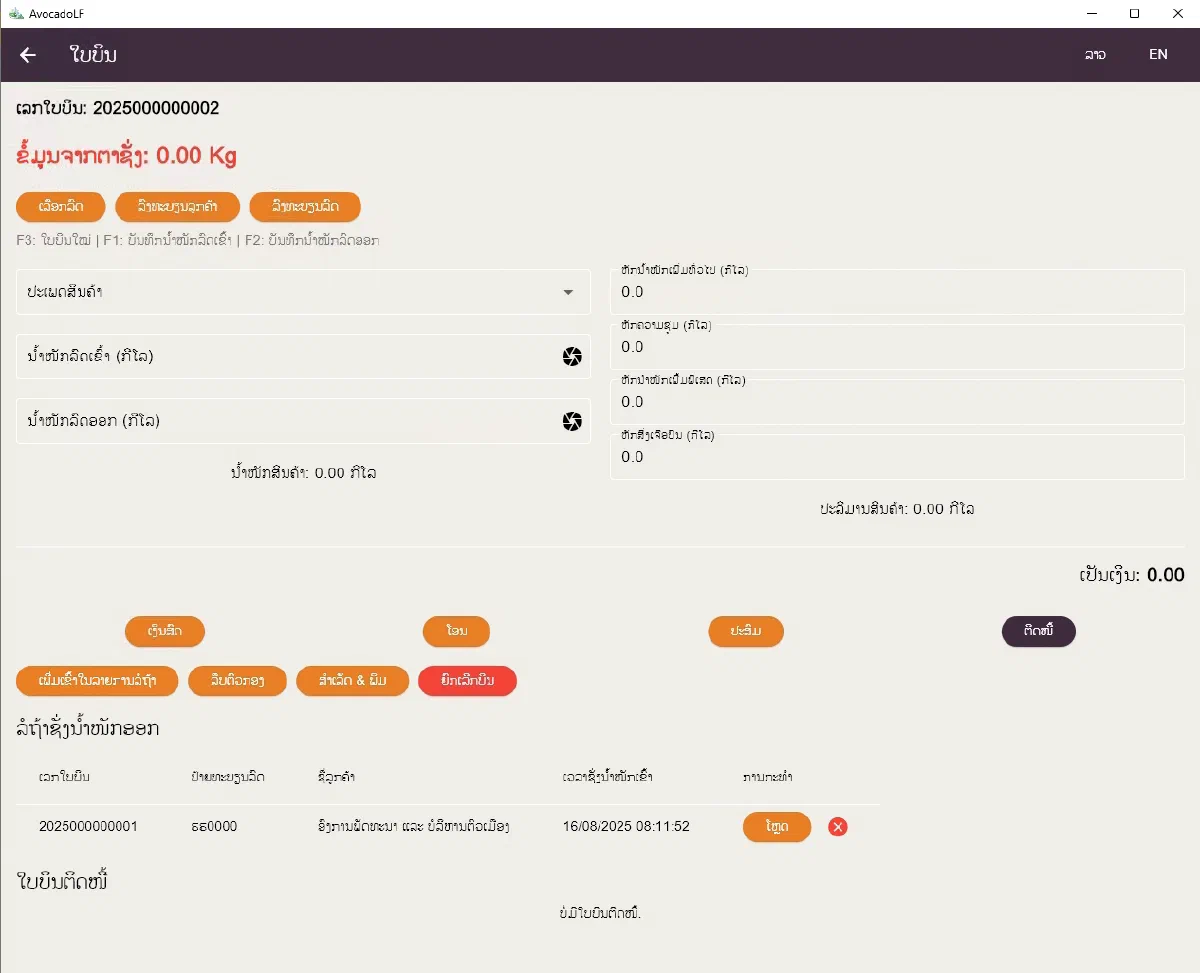
The billing screen is where the operator spends the day. It follows the real sequence at the weighbridge:
- Identify the truck. Search the registered vehicles by plate number, or register a new customer or vehicle on the spot.
- Weigh in. The live reading from the electronic scale is shown at the top of the screen; one click (or F1) captures the loaded weight.
- Wait. The truck goes onto the waiting list — bill number, plate, customer and weigh-in time — while it unloads.
- Weigh out. The operator loads the truck back from the waiting list and captures the empty weight (F2).
- Calculate. The waste weight is computed automatically. Deductions can be applied — general, moisture, special and impurities — to reach the chargeable net weight. The amount follows the rate for the waste type, or a fixed price per load for vehicle types billed that way.
- Pay. Cash, bank transfer, a mix of both, or credit for account customers.
- Complete & print. The receipt prints on A5, an 80 mm thermal printer or A4. F3 starts the next bill.
Behind the counter
The rest of the system makes the numbers trustworthy for management:
- Customers and vehicles — customer records with contact people and their vehicles.
- Credit management for customers who pay on account.
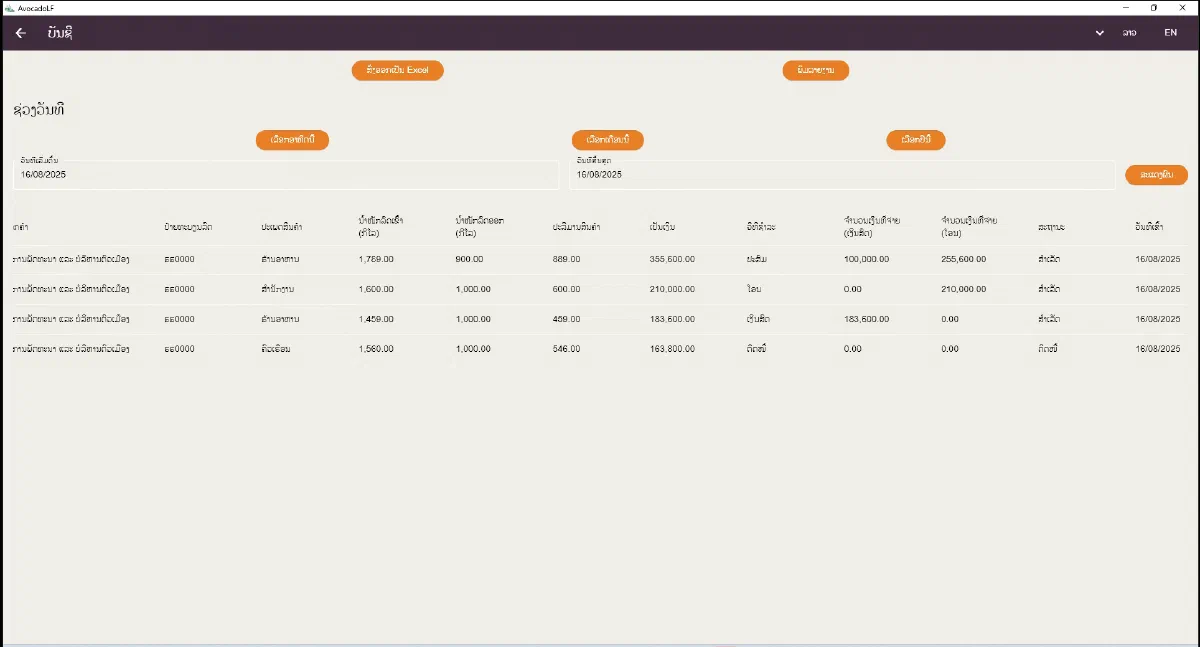
- Accounting — bills for any date range (with one-click week, month and year to date), totals, and export to Excel, CSV or PDF, or a printed report.
- Roles — Super User, Manager and Officer, each with its own home screen and permissions.
- Control — supervisor approval for sensitive operations, a mandatory comment when a bill is cancelled, and an audit log of important events.
- Internal use — the system recognises the authority’s own vehicles and waste and applies the right payment method automatically.
- Practice mode — new staff can train on realistic scenarios without touching real data.
- Backup and restore of the master data.
- Lao and English throughout, switchable at any time.
How it’s built
- Flutter, compiled as a native Windows desktop application.
- SQLite with encryption for local storage, plus an automatic schema-migration system so upgrades never lose data.
- libserialport to read the weighing indicator over a serial connection, with tolerant parsing of the formats scales send (for example
+00000000Bor90kg). - A single-instance lock, so two copies of the program can never run at once on the weighbridge PC.
What I learned
- Design for the operator at the weighbridge. Big, clear screens, keyboard shortcuts and fast plate search mattered more than clever features.
- Real hardware is messy. Scales send data in different formats; parsing had to be tolerant, logged and tested.
- Auditability is a feature. Cancellation comments, supervisor overrides and logs are what make the totals credible to management.
- Training built into the software — practice mode — prevents more mistakes in the first weeks than any manual.
Running a weighbridge, a counter or any process that still lives on paper and spreadsheets? Vangera Systems builds software around how your operation actually works. Get in touch through the contact form. You can also read about an older project of mine: the Institut Pasteur du Laos website, on WordPress since 2011.